JYE Tech

Industry and educational instruments like oscilloscope, function generator, LCR meter. Unique instrument DIY kits.

  • Products
  • Support
    • Drivers and Tools
    • Support Documents
  • Forum
  • Buy
    • Online Store
    • Distributors
    • Order from us
    • Contact us

miniDDS Firmware

Main Controller Firmware (U5, ATmega168)

Version Revision History
113-08501-132 [ 2014.08.01 ]
Allow user to restore factory default at power-up. At the firmware version screen pushing ADJ knob will perform factory default restore.
113-08501-130 [ 2013.03.19 ]

  • Arbitrary waveform generation (AWG) has been implemented. With support of jyeLab FG085 can now generates any user defined signals.
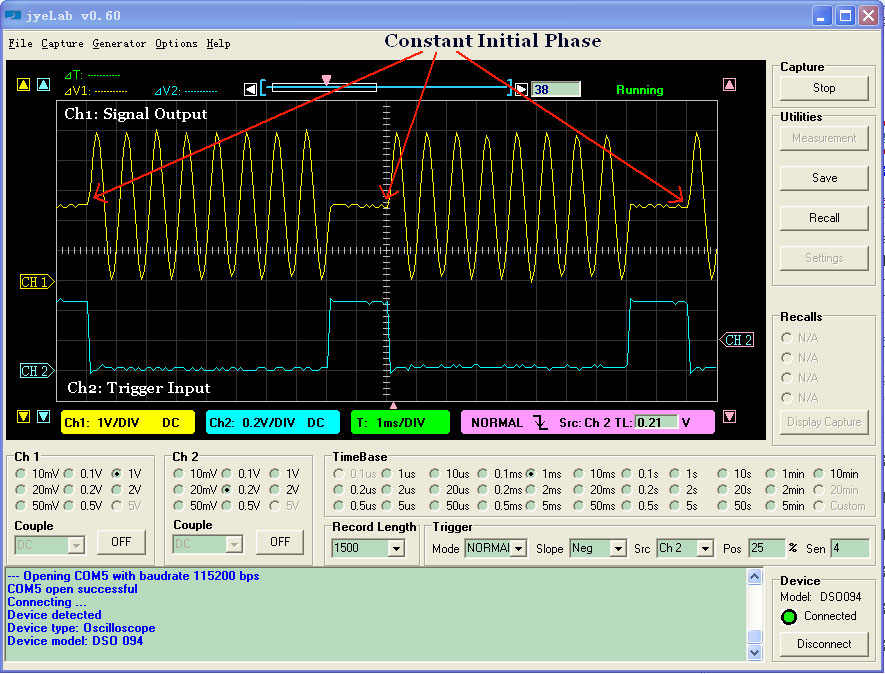
  • Implemented trigger input function. Now Output can be controlled by an external TTL signal or a switch. Pressing [ADJ] dial will toggle trigger function on/off.

    Photo of trigger function

  • Duty cycle (for square signal only) becomes changeable by user. The change range is 1 – 100% with resolution of 1%. Use [.] (decimal point) button to access the feature.
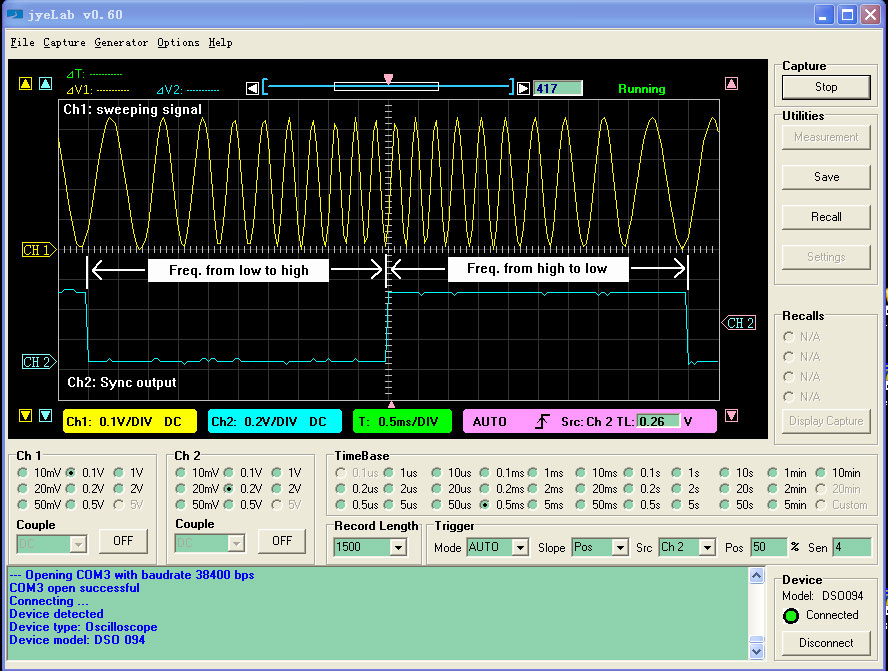
  • Improved frequency sweep function. High-to-low sweep can now be done by setting start frequency greater than stop frequency.
  • Bi-directional sweep can be enabled/disabled by pressing [+/-] button.

    Photo of bi-directional sweep

Note:
Firmware version of 113-08502-050 or later must be used for U6 to enable the added features.

113-08501-120 [ 2012.09.16 ]

  • Frequency sweeping feature added. Start frequency, stop frequency, sweep time, and time step size are easily and independently
    set by digits. Alternatively buttons [1] – [4] can be used to access these parameters.
  • Improved frequency accuracy for signal less than 40Hz in CW mode. Now the maximum frequency error for signal freq. < 40Hz is 0.0005960Hz. Previously this was only true for freq. < 1Hz.
  • Changed powering-up screen. DDS core firmware version is also displayed.
    • Note:
      Firmware version of 113-08502-041 or later must be used for U6 to enable the added features.

113-08501-110

[ 2012.06.20 ]

In CW mode frequency and time steping size now can be set to any whole number value. Usage:

  • Press [Digits] + [Hz] to set frequency step size. Use [ESC] to correct or exit. Unit is in Hz only.
  • Press [Digits] + [mS] to set time step size. Use [ESC] to correct or exit. Unit is in mS only.
  • Pressing [Hz] will display current frequency step size. Pressing [ESC] returns to normal.
  • Pressing [mS] will display current time step size. Pressing [ESC] returns to normal.
113-08501-100 [ 2011.06.19 ]

  • Added features of servo control signal generation.
  • Added user customizable powering-up screen.
  • Changed the behaviour of [ESC] key in data entry correction.

Notes:
Firmware version of 113-08502-030 or later for U6 must be used to enable the added features.

113-08501-050

[ 2011.05.06 ]

First release

DDS Core Firmware (U6, ATmega48)

Version Revision History
113-08502-053 [ 2014.08.01 ]

Fixed a bug that caused frequency error when frequency setting is less than 40Hz.

113-08502-050 [ 2013.03.19 ]

Modified to work with the new features added in 113-08501-130.

113-08502-041 [ 2012.09.16 ]

Modified to work with the new features added in 113-08501-120.

113-08502-031 [ 2012.05.12 ]

Improved robustness for parameter input.

113-08502-030 [ 2011.06.19 ]

Modified to work with the new features added in 113-08501-100.

113-08502-020 [ 2011.05.06 ]

First release

Stayed informed with the latest product news from JYE Tech

Plus, get a coupon for a FREE probe accessory kit when you order a scope on AccuDIY.com!


Back to top

© 2008 - 2025 JYE Tech Ltd.

Terms & Privacy Policy | Contact