JYE Tech

Industry and educational instruments like oscilloscope, function generator, LCR meter. Unique instrument DIY kits.

  • Products
  • Support
    • Drivers and Tools
    • Support Documents
  • Forum
  • Buy
    • Online Store
    • Distributors
    • Order from us
    • Contact us

jyeLab (PC oscilloscope)

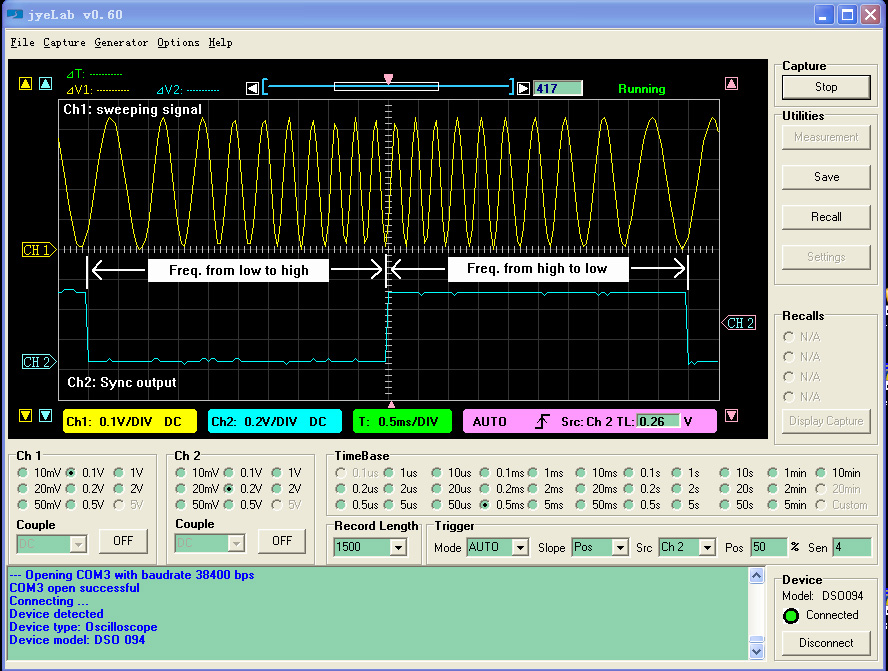
Screenshot of jyeLab PC Oscilloscope

jyeLab is a PC platform for JYE Tech Instruments. It can work with JYE Tech standalone oscilloscopes to function as PC oscilloscopes. It is also a tool for downloading user defined arbitrary waveforms to FG085 function generator.

Major features include:

  • Realtime waveform display/capture.
  • Save/recall waveforms to/from file.
  • Upload pre-saved captures from a standalone oscilloscope
  • Horizontal cursors with frequency display
  • Vertical cursors that are channel associated
  • Download user waveforms to FG085 generator
Limitations and requirements of jyeLab (as of v0.70)

jyeLab only runs under Windows and supports DSO 094, DSO 068, and FG085.
Pre-installation of USB virtual COM port driver (for CP2102 from Silicon Labs) is required. The driver can be downloaded directly here.
The standalones must be upgraded to supporting firmware.

Usage

Use of jyeLab is straightforward and easy. No installation required. Most operations are self-explained. To start please follow these steps:

  • Download the application and unzip all the files to the same folder.
  • Install USB virtual COM port driver (see "requirements" above).
  • Connect your JYE Tech standalone oscilloscope (Device) to a USB port on the PC.
  • Start jyeLab and power up the standalone.
  • Identify the virtual COM port that connects the standalone and select it. You can do this in the menu "Options -> Port Setup".
  • Click the button "Connect". You can see the connection status light turn green if connection success.
  • To disconnect click the "Disconnect" button. Alternatively you can press the [HOLD] key on the standalone.
  • To toggle cursors click on their readouts at upper-left screen corner.
  • To save/recall waveforms use the "Save" "Recall" buttons at right or the File menu.
  • To download waveform to FG085 first open the waveform file to load it into capture buffer. Then click "Generatro -> Download (FG085)".

Download

VersionRevision History
v0.70 [ 2014.03.17]
Added support for DSO 068.
v0.61 [ 2013.03.20]
Fixed minor bug in FG085 waveform data downloading. The bug caused some samples missing under certain conditions.
v0.60 [ 2013.03.18]
Supports uploading of saved captures in DSO094. (Usage: go to "Capture->Upload" and select the buffer to load from. DSO094 firmware upgrade to 113-09401-060 or later required.)
Supports user defined waveform downloading for FG085. (Usage: open a prepared waveform file and click "Generator -> Download". FG085 firmware upgrade to 113-08501-130 and 113-08502-050 required.)
Added frequency display for horizontal cursor.
v0.50 [ 2013.01.31]
Added waveform save/recall feature. Waveforms are saved in csv file format which can easily be opened and processed by other applications like Excel.
Added horizontal and vertical cursors. Vertical cursors are associated with Ch1/Ch2 respectively. Click on cursor readouts will toggle cursors ON/OFF.
Serial port baudrate are changeable. Can work up to 115200 bps with DSO 094 (094 firmware upgrade to 113-09401-052 required).
v0.40 [ 2012.08.08]
Preliminary release

Documents:

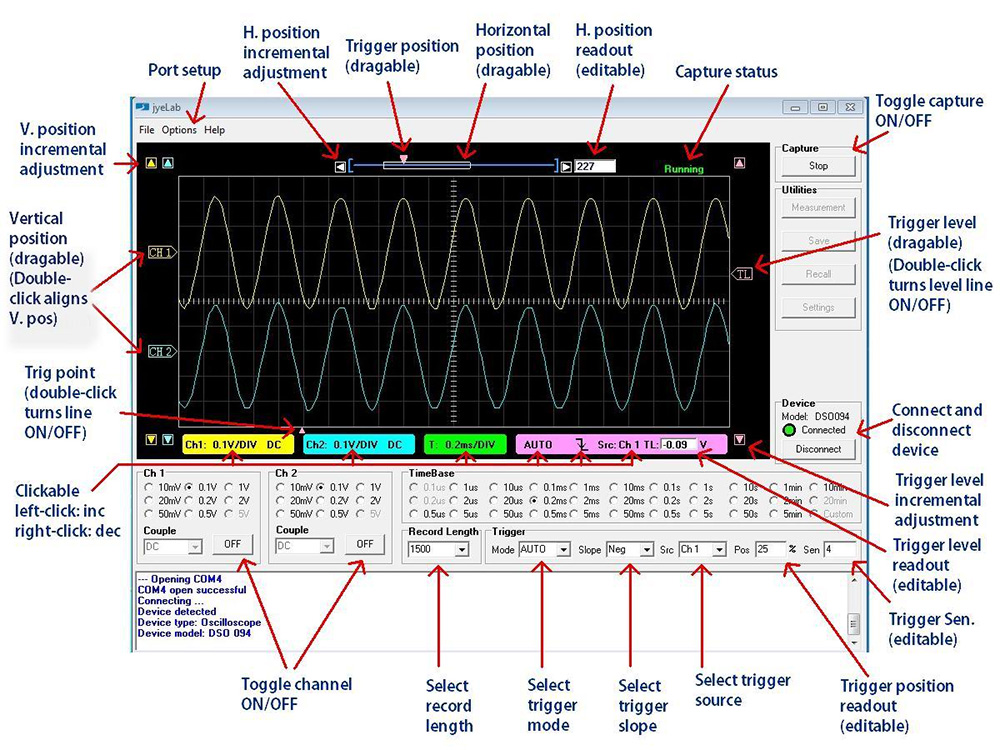
Operation Diagram

Stayed informed with the latest product news from JYE Tech

Plus, get a coupon for a FREE probe accessory kit when you order a scope on AccuDIY.com!


Back to top

© 2008 - 2026 JYE Tech Ltd.

Terms & Privacy Policy | Contact

We use cookies to ensure that we give you the best experience on our website. If you continue to use this site we will assume that you are happy with it.Ok